5 Ways to Automate WhatsApp Workflows Using n8n and Peach
If your customer communications are locked inside a separate messaging inbox, your team is likely wasting hours on manual tasks. Sales reps copy contact details by hand, support agents send repetitive delivery updates, and marketing campaigns have to be launched manually for every new cohort.
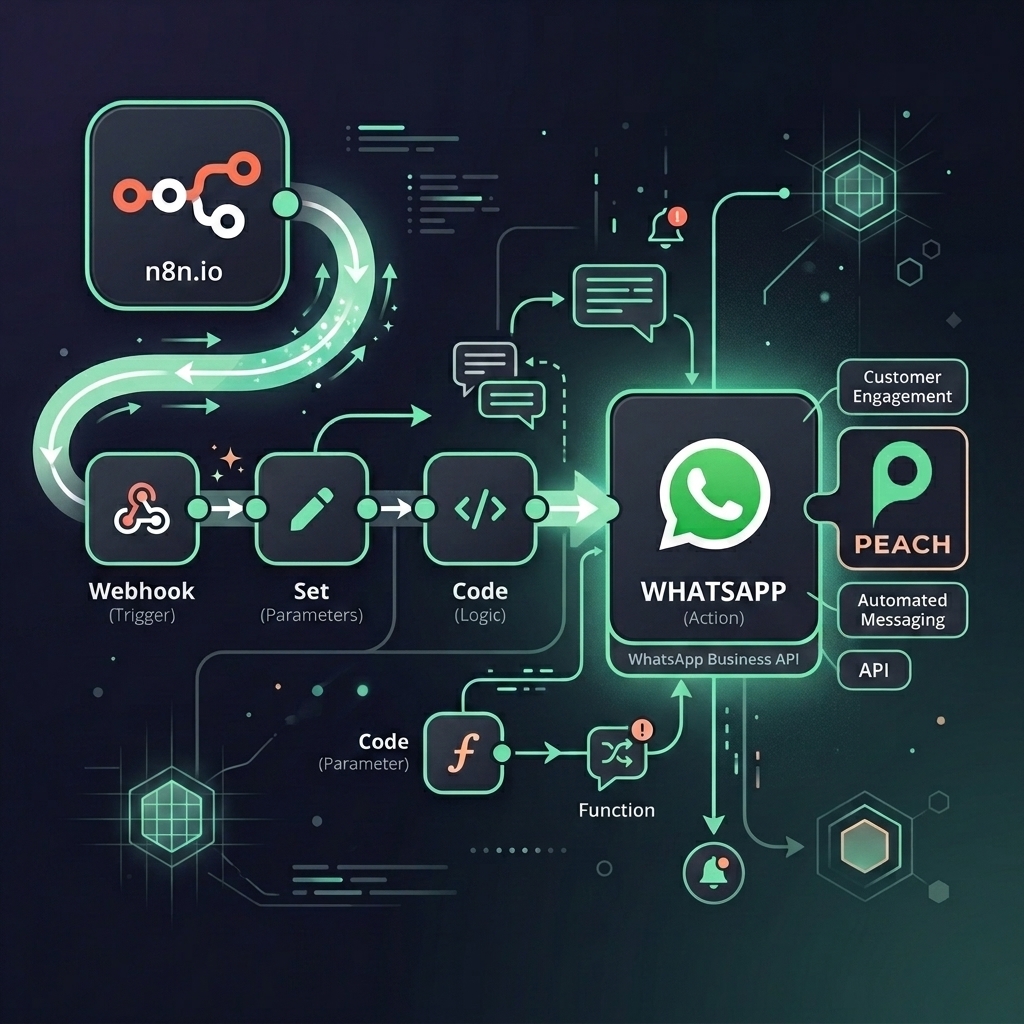
By connecting n8n with Peach, you can bridge the gap between WhatsApp and your business tools. You can automate outbound template notifications, trigger bulk campaigns, and use AI to capture information—keeping your data synced in real-time. For example, you can deploy intelligent workflows by following our WhatsApp AI Agent implementation guide.
Here are 5 practical, real-world business workflows you can automate today using n8n and Peach, complete with industry examples.
1. Automated Welcome & Lead Info Capture (AI-Driven)
- The Business Context: When a new prospect requests info or fills out a form on your site, you want to immediately start a conversation and collect key details (like company size or industry) without manual rep outreach.
- The n8n Workflow:
- A form submission (via Typeform or Webflow) triggers n8n to send a personalized welcome template via Peach.
- When the prospect replies on WhatsApp, n8n receives the message payload and routes it through a simple LLM/AI node to extract relevant details (e.g., company name or interest area).
- n8n then uses the Peach action node to automatically update the contact’s profile in Peach with these new custom attributes, preparing them for the sales team.
- Industry Example (EdTech & Higher Education): When a student downloads a course syllabus on your website, n8n triggers a WhatsApp message. If the student replies asking about financing, n8n uses an AI node to extract their preferred start date and financial questions, then automatically logs these preferences in Peach under custom student tags.
2. Transactional Order & Delivery Notifications
- The Business Context: E-commerce customers expect instant updates on their orders. Checking email spam folders for tracking links is a poor user experience.
- The n8n Workflow:
- When a customer makes a purchase or when a package is shipped, your store (like Shopify or WooCommerce) sends an event to n8n.
- n8n dynamically generates the order details and triggers a WhatsApp template message via Peach containing the order confirmation, receipt, or live carrier tracking link.
- Industry Example (D2C Retail & E-commerce): A bicycle retailer (like BOTS) triggers a WhatsApp message the moment a package is shipped, sending the customer their carrier tracking URL and a friendly reminder on how to assemble their bike when it arrives.
3. Triggering Marketing Broadcasts from CRM or Sheets
- The Business Context: Marketing teams want to trigger targeted promotional blasts or product launch newsletters to specific cohorts without exporting CSVs and manually uploading them to a messaging tool.
- The n8n Workflow:
- When you update a Google Sheet with a list of contacts, or when leads move to a specific lifecycle stage in your CRM, n8n triggers.
- n8n calls Peach’s native broadcast API to automatically launch a pre-approved template campaign to that exact audience segment in real-time.
- Industry Example (Real Estate): When a broker adds new listings to an active property database, n8n identifies match criteria for registered buyers and automatically triggers a Peach broadcast, sending listing images and tour booking details straight to matching buyers on WhatsApp.
4. Failed Payment & Subscription Renewal Reminders
- The Business Context: When a customer’s subscription payment fails, emails warning them of account suspension are often ignored, leading to unintentional churn.
- The n8n Workflow:
- Stripe or your billing platform registers a
payment_failedevent and alerts n8n. - n8n triggers an automated WhatsApp message via Peach, sending a friendly notification along with a direct link to the customer’s secure billing page to update their payment details.
- Stripe or your billing platform registers a
- Industry Example (SaaS & Digital Memberships): A SaaS platform triggers a WhatsApp notification after a customer’s credit card fails on a renewal attempt, offering a direct, secure billing update link to prevent service disruption.
5. Automated Support Updates & Handoffs
- The Business Context: When support tickets are created or updated, sending WhatsApp alerts keeps the client informed and reduces repeat queries about ticket status.
- The n8n Workflow:
- When a support ticket is opened or resolved in helpdesks like Zendesk, Jira, or Freshdesk, n8n registers the status change.
- n8n automatically sends a WhatsApp message via Peach notifying the customer of the update and sharing the ticket ID, ensuring they stay informed without manual input from support reps.
- Industry Example (Healthcare & Clinics): When a medical lab system marks a patient’s results as “Ready,” n8n triggers an automated WhatsApp message via Peach, informing the patient that their secure report is available in the clinic’s portal and reducing incoming front-desk check-in calls.
🚀 How to Get Started
Connecting n8n’s automation builder with Peach’s WhatsApp integration takes the manual work out of your day-to-day operations.
Ready to build your first workflow?
- Sign up for a Peach account
- Check out the Peach n8n Integration Guide to download pre-built workflow templates.
The Peach Team
Expertise in WhatsApp Sales & AI