How to launch WhatsApp Campaigns using WhatsApp Business MCP

How to launch WhatsApp Campaigns using WhatsApp Business MCP
TL;DR: The bottleneck in WhatsApp marketing isn’t clicking “send” on a broadcast—standard Business Solution Provider (BSP) software can do that. The real friction is the days spent exporting CSV lists, analyzing CRM segments, copy-writing highly personalized message variants, and submitting compliance templates. By pairing Claude Desktop with the hosted WhatsApp Business MCP, growth marketers can pull database metrics, write customized campaigns, and queue broadcasts in a single sitting using simple conversational prompts.
Moving Beyond Static BSP Campaign Management
Traditional BSP platforms and Meta business partners—including Peach—historically treat WhatsApp campaigns as static operations. You write a template, upload a CSV list of contacts, and blast the message.
But modern marketing demands hyper-personalization and speed. When you want to trigger custom campaigns based on real-time customer behavior, standard tools force you to jump between your CRM, your database, your copywriter, and your WhatsApp campaign manager.
The Model Context Protocol (MCP) changes this by turning your AI assistant (like Claude Desktop) into a unified growth operator. Because Peach hosts the WhatsApp Business MCP server for you, you do not need to configure any local code. You simply connect Claude to your Peach account and use natural language to analyze data, write personalized copy variants, and launch compliant Meta campaigns.
How It Works: End-to-End Campaigns in One Chat Thread
By exposing your customer database and the WhatsApp Business API as tools to Claude, you consolidate days of campaign planning into minutes.
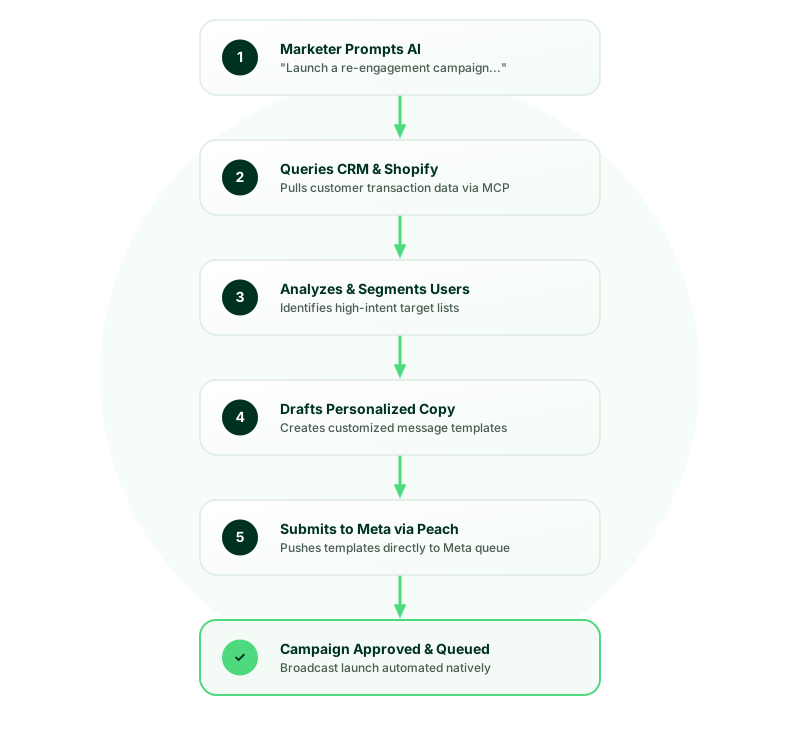
Here is the step-by-step workflow:
1. Contextual Data Pulling
Instead of exporting files from HubSpot or Shopify, you ask Claude to inspect your metrics directly. Claude uses Peach’s hosted MCP server tools to pull active contact segments, review transaction histories, or identify users stuck at specific pipeline milestones.
2. Conversational Copywriting & Variant Testing
Once Claude has the segment context, you instruct it to write targeted copy. You can generate dozens of hyper-personalized message variants matching different customer subsets without sweating the formatting or variable syntax.
3. Native Template Submission & Queueing
Once you approve the copy drafts, Claude formats them into Meta-compliant schemas and calls the create_template tool via the MCP server to submit them directly for review. Once Meta approves, Claude alerts you in the chat and queues the broadcast for the specified segment.
3 Real-World Examples: How Growth Teams Use the WhatsApp Business MCP
Here is how different industries leverage conversational campaigns to bypass manual execution:
🛍️ 1. D2C E-Commerce: Hyper-Personalized Product Re-Engagement & Up-sells
- The Scenario: Instead of standard automated cart recovery journeys, a growth marketer wants to run a targeted campaign for customers who purchased or abandoned a specific high-value product (e.g., a premium leather jacket) in the last 30 days to offer them a tailored accessory or a customer satisfaction discount.
- Marketer Prompt:
“Claude, check our Shopify records via Peach. Find customers who purchased or abandoned the ‘Premium Moto Jacket’ last month. Draft a personalized campaign template suggesting a matching leather conditioner or cardholder, using their first name. Once approved, submit the template.”
- The Outcome: Claude scans the past month’s product logs, drafts a highly context-specific up-sell copy, formats variables, and pushes the template directly to Meta’s review queue.
🎓 2. High-Ticket EdTech: Class Drop-out Activation
- The Scenario: A course admissions lead wants to follow up with prospective students who booked a syllabus walkthrough but never completed their course registration.
- Marketer Prompt:
“Look at our HubSpot contacts. Identify leads who attended a data science syllabus demo in the past 7 days but have not enrolled. Write a WhatsApp message addressing their interest in data science, highlighting our new batch starting Monday, and draft a call-to-action button linking directly to checkout. Submit this template for review.”
- The Outcome: Claude pulls the high-intent segment, drafts copy addressing their specific syllabus demo, configures the CTA button metadata, and queues it for Meta approval.
🏦 3. FinTech / Financial Services: Application Drop-off Recovery
- The Scenario: A loan operations manager needs to prompt applicants who dropped out of the loan funnel due to incomplete document uploads.
- Marketer Prompt:
“Identify loan applications that have been stuck in the ‘Verification Pending’ stage for over 48 hours. Group them by what is missing (e.g., ID proof vs. bank statement). Draft custom WhatsApp templates requesting the specific document, format the document upload link button, and submit them.”
- The Outcome: Applicants receive a direct, context-aware nudge detailing precisely what document they need to upload to proceed, significantly accelerating loan processing cycles.
Get Started Natively via Peach
Because the WhatsApp Business MCP server is fully hosted by Peach, setting it up takes less than a minute. You can connect it to any MCP-compatible AI assistant—such as Claude Desktop, Cursor, ChatGPT, VS Code, or Windsurf.
Here is the quick setup flow:
- Log into your Peach dashboard.
- Copy the hosted MCP server configuration code snippet for your preferred assistant.
- Paste it directly into your assistant’s MCP configuration settings.
For a complete step-by-step guide, check out this 60-second walkthrough video:
Now, you can query your lists, write campaigns, and command your WhatsApp Business account directly through your favorite AI chat assistant.
- Ready to upgrade your campaign workflows? Get Started with WhatsApp Business MCP Here
The Peach Team
Expertise in WhatsApp Sales & AI