The Ultimate Guide to WhatsApp Chat Assignment: Round Robin, AI Escalation, & Visibility
For scaling sales and support teams, managing a single WhatsApp Business number can quickly descend into chaos. Without structural guardrails, incoming messages sit unaddressed, team members accidentally double-reply to the same customer, and high-value leads are dropped.
To scale operations on WhatsApp, you need a predictable, automated framework for distributing conversations.
This guide outlines how to design a high-performing WhatsApp assignment system, covering equal distribution, intelligent AI-to-human escalation, and granular visibility settings to keep your team focused.
Why Chat Assignment Matters
Relying on manual triage—where agents cherry-pick chats from a shared inbox—leads to three main operational failures:
- Inefficient Response Times: Difficult support queries or cold leads are avoided, while easy conversations are claimed instantly.
- Double-Handling: Multiple agents reply to the same customer simultaneously, making the company look disorganized.
- Information Silos: Without explicit ownership, accountability drops, and management has no clear way to track individual agent performance.
Establishing structured routing protocols ensures every incoming message immediately finds a dedicated owner, protecting both the customer experience and your team’s internal workflows.
1. Round Robin: Equal Lead Distribution
A Round Robin queue automatically and sequentially distributes incoming WhatsApp conversations among a defined group of active agents.
[ Incoming Chat ] ───► [ Round Robin Queue ] ───► Agent A ──► Agent B ──► Agent C
This ensures a completely unbiased, equal distribution of workload. Within Peach, you can configure Round Robin queues with one critical guardrail:
- Activity and Status Checks: Chats must only route to agents who are currently marked “Online” or “Available.” If an agent is out of office, the queue skips them to avoid message delays.
2. Dynamic Team Queues (Department Routing)
Not all inquiries are equal. A technical support issue requires a different set of skills than a high-intent pricing inquiry. Segmenting your team into specialized queues prevents unnecessary internal transfers.
You can route chats into these queues using two primary triggers:
A. Customer Self-Selection (Interactive Buttons)
When a customer first messages your WhatsApp number, they are greeted with an interactive button template or list menu.
                       ┌──► [ Button: "Sales" ] ──────► Route to Sales Queue
[ Welcome Message ] ───┼──► [ Button: "Support" ] ────► Route to Support Queue
                       └──► [ Button: "Billing" ] ────► Route to Finance Queue
Once a button is clicked, Peach routes the conversation to the corresponding department queue, triggering a Round Robin assignment within that specific group.
B. Metadata & Language Routing
If a customer’s phone number begins with a specific country code, or if they came from a localized regional marketing campaign, the system can bypass menus entirely. For example, contacts with country code +44 can be routed directly to your UK Account Executive queue.
3. AI-to-Human Hand-off (AI Escalation)
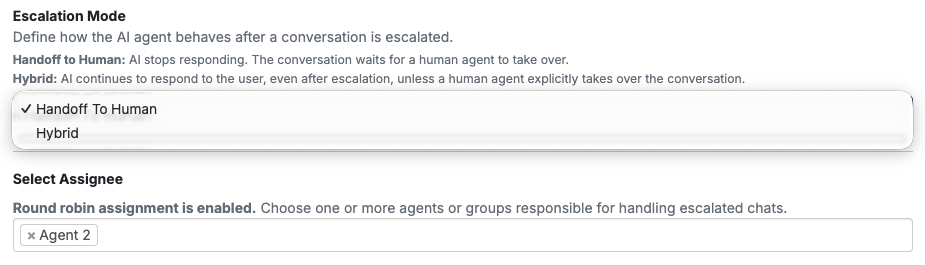
Using task-oriented AI micro-agents to frontline your WhatsApp inbox allows you to qualify leads and answer basic queries. However, a successful automated system depends heavily on a seamless hand-off to a human agent when the conversation demands it.
[ AI Agent Qualifies ] ───► [ Trigger: Complex Query / Human Request ] ───► [ Auto-Assign to Human Rep ]
Designing the Handoff Trigger
A transition from AI to a human rep should occur under three specific conditions:
- Explicit Request: The user types phrases like “I want to speak to a human” or “Agent please.”
- Negative Sentiment/Frustration: The AI detects user frustration or repetitive, unresolved loops.
- Successful Qualification: The AI successfully gathers required data (e.g., business size, email address, budget) and marks the conversation ready for a human closer.
Context Preservation (The “No-Repeat” Rule)
The biggest friction point in customer support is forcing a customer to repeat their problem to a human after explaining it to an AI.
When a hand-off occurs in Peach, the system pauses the active AI micro-agent and assigns the conversation to a human queue. The assigned human agent receives the conversation alongside a structured metadata log of the information the AI already collected, allowing them to step in seamlessly.
4. Granular Workspace Visibility
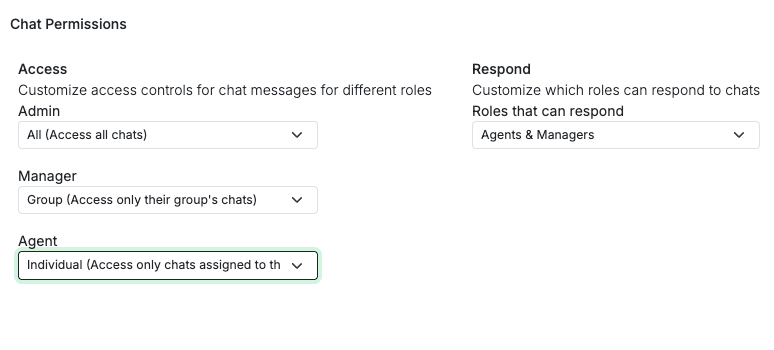
A critical part of chat assignment is controlling what your team can see. If every agent has access to every chat, the shared inbox becomes visually overwhelming, and customer privacy is compromised.
Implementing role-based visibility rules keeps your team organized:
| Role | Visibility Level | Primary Action |
|---|---|---|
| Sales/Support Rep | Assigned Only | Can only see and respond to chats explicitly assigned to them or their specific queue. |
| Team Lead / Pod Manager | Queue/Group Only | Can monitor all chats within their department, reassign stalled conversations, and view team analytics. |
| Admin | Global Workspace | Complete visibility across all teams, system configuration, and master audit logs. |
This setup protects customer data privacy, prevents lead poaching among competitive sales reps, and allows individual contributors to focus entirely on their active tasks.
2 Common Assignment Workflows to Build
Workflow A: Click-to-WhatsApp Lead Assignment
- The Entry: A prospect clicks a Facebook or Instagram ad and initiates a WhatsApp conversation.
- The Frontline: A Lead Qualification Agent engages the prospect, asking for their company name and primary use case.
- The Trigger: Once those two fields are populated, the AI marks the contact as qualified.
- The Assignment: Peach assigns the contact to the “Enterprise Sales” Round Robin queue, notifying the assigned rep instantly in the shared inbox.
Workflow B: Post-Support Call Triage
- The Entry: A customer calls your support line and is sent an automated WhatsApp template to continue support.
- The Menu: The customer selects “Technical Issue” from an interactive button list.
- The Assignment: The chat is assigned directly to the “Tier 1 Technical Support” queue.
- The Escalation: If the Tier 1 agent cannot resolve the issue, they manually re-route the ticket to the “Senior Engineering” queue, automatically revoking their own write permissions to keep their personal inbox clean.
Crucial Operational Caveats
When building out your routing and assignment flows, keep these system rules in mind:
- Configure a “Catch-All” Queue: Every assignment engine needs a safety net. If an incoming message fails to match any of your department or button routing rules, configure the system to drop it into a global, unassigned workspace. This ensures no message is lost in a routing deadlock.
- Establish SLA Assignment Revocation: If a conversation is assigned to an active agent via Round Robin but remains unanswered for more than 15 minutes, configure a fallback rule to automatically unassign the chat and return it to the queue or escalate it to a team lead.
- Configure After-Hours Handlers: Do not route live chats to agents overnight. Implement a schedule check that automatically triggers a polite “Away” template message and places incoming chats into a holding queue to be distributed when your team logs back in the following morning.
Prerequisites
- Peach Account
- WhatsApp Business API
- Active Support/Sales Team Setup